At a glance
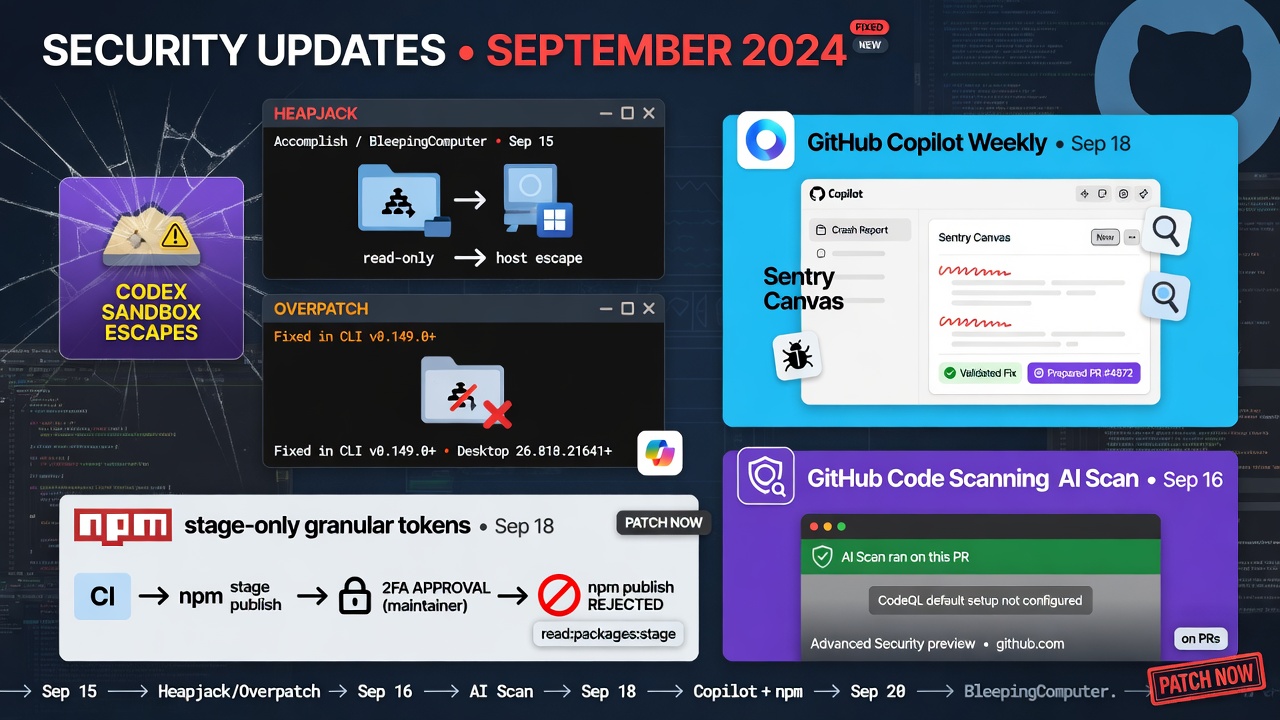
- Accomplish (Sep 15) and BleepingComputer (Sep 20) detail Heapjack and Overpatch: Codex sandbox escapes that reach the host from read-only or workspace-write, fixed in CLI v0.149.0+ and Desktop 26.818.21641+.
- GitHub Copilot's weekly (Sep 18) adds a Sentry canvas in the Copilot app so crash reports can move into investigation, a validated fix, and a prepared pull request.
- npm (Sep 18) ships stage-only granular tokens: CI can `npm stage publish` while maintainers approve with 2FA, and direct `npm publish` is rejected.
- GitHub code scanning AI Scan (Sep 16) now runs on PRs even when CodeQL default setup is not configured (Advanced Security preview on github.com).
Monday is thin for brand-new Sep 19–21 product GAs, so the useful work is trust and release hygiene after yesterday’s Plugin4Shell brief. Codex’s sandbox was not an outer host boundary for older builds, Copilot shortens crash-to-PR loops inside the app, stage-only npm tokens keep agent CI from pushing live packages, and AI Scan covers more repos without forcing CodeQL default setup.
Treat today as a Codex-pin, Sentry-canvas, stage-only-publish, and AI-Scan-coverage day. Confirm Codex CLI is past v0.149.0 (prefer the v0.155.1 pin from Sunday if you already took it), update Desktop past 26.818.21641 where installed, try one Sentry issue through the Copilot app canvas, swap one publish job to a stage-only token, and spot-check whether AI Scan already covers repos that never enabled CodeQL default setup.
Top Stories
Heapjack and Overpatch: Codex sandbox escapes from read-only and workspace-write Practical dev impact: Accomplish (Sep 15) and BleepingComputer (Sep 20, with an OpenAI statement added Sep 21 ET) describe two escapes reported Aug 12 and fixed within eight days. Overpatch sits in Codex CLI `workspace-write`: `apply_patch` granted write access to the parent of each path in a patch, so naming `/tmp` widened the grant toward `/`, and a workspace symlink into `$HOME/.zshrc` let the next shell run attacker code unsandboxed. Heapjack sits in the Desktop-installed `node_repl` MCP helper (written into `~/.codex/config.toml`, so CLI sessions inherit it): trusted and untrusted V8 `vm` contexts shared one heap, so untrusted code recovered the auth token via `v8.getHeapSnapshot()`, forged requests to the unsandboxed native parent, and ran host commands (PoC used macOS `open`) from read-only with no approval prompt. Opening someone else’s repo and asking about the code is enough for the Heapjack path. Patches land in CLI v0.149.0+ (changelog includes preventing `apply_patch` from widening write permissions) and Desktop build 26.818.21641+. This is a different failure class from Sunday’s Plugin4Shell marketplace SHA pin bypass, so treat “we already pinned for Plugin4Shell” as incomplete until CLI and Desktop (and any launcher that still points at an old helper) are verified separately.
Copilot app Sentry canvas: crash report to prepared pull request Practical dev impact: GitHub’s Copilot weekly releases post (Sep 18, covering the week of Sep 14) adds a Sentry canvas in the GitHub Copilot app. You can review errors, stack traces, and related context, then work with Copilot to investigate the cause, validate a fix, and prepare a pull request without bouncing across five tabs. If your team already pipes production crashes into Sentry and uses the Copilot app, this is the shortest path from incident to a draft PR. Keep claims inside that canvas workflow (investigate, validate, prepare PR) rather than assuming auto-merge or CI green.
Stage-only npm tokens: CI stages packages, humans approve with 2FA Practical dev impact: GitHub Changelog (Sep 18) lets you create an npm granular access token with Read and write (stage only). Automation runs `npm stage publish` to submit a version; a maintainer reviews and approves with 2FA (CLI or npmjs.com); that token rejects direct `npm publish` even when configured to bypass 2FA for automation. Stage-only tokens still retain other package write permissions such as dist-tags and deprecating versions, so protect them like any write token. The change is opt-in and does not alter existing tokens. npm is targeting January 2027 to remove direct publishing through bypass-2FA tokens, and stage-only is the migration path when trusted publishing is not ready yet. You need publish access, 2FA on the npm account, npm CLI 11.15.0+, and Node.js 22.14.0+. For agent-heavy release pipelines, this is the difference between a staged review queue and a live registry write from a stolen CI secret.
AI Scan for PRs without CodeQL default setup Practical dev impact: GitHub Changelog (Sep 16) removes the requirement that CodeQL default setup be configured before AI Scan for pull requests can run. Code scanning and AI Scan must still be enabled at the repository, organization, or enterprise level (when the org belongs to an enterprise), with the same permission hierarchy and no new setup step. If AI Scan is already on for the org, it now runs more broadly across eligible repositories. The change is in public preview on github.com for GitHub Advanced Security customers; GitHub Enterprise Server is not supported for this release. Use it as coverage expansion for Advanced Security orgs that never turned on CodeQL default setup, not as a free replacement for CodeQL itself.
Practical Impact Analysis
The through-line is trust boundaries around agents and the pipes that ship their output. Heapjack and Overpatch show that sandbox modes and marketplace pins are not the same control: read-only failed inside a shared-heap helper, and workspace-write failed when a patch tool derived its own permissions, so Sunday’s Plugin4Shell pin work does not close Monday’s Codex gap. The Copilot Sentry canvas then shortens the human loop from production crash to a prepared PR, while stage-only npm tokens keep that same agent energy from publishing straight to the registry. AI Scan without CodeQL default setup widens security review on PRs that agents already open, without forcing every repo onto CodeQL default setup first.
If you run Codex on developer laptops, Monday is the day to inventory CLI and Desktop separately, restart after updates, and confirm `codex –version` and the Desktop build id before treating untrusted repos as safe to open in read-only. If you already live in the Copilot app with Sentry, walk one real crash through the canvas and decide whether that replaces your old handoff checklist. Release owners should create one stage-only token for a non-critical package and swap `npm publish` to `npm stage publish` in CI, then document who approves. Advanced Security admins should check whether AI Scan is already enabled org-wide and which repos gain coverage now that CodeQL default setup is no longer a gate.
If you only do three things this morning: verify Codex CLI ≥ v0.149.0 and Desktop ≥ 26.818.21641 on every launcher, replace one CI publish token with stage-only plus `npm stage publish`, and open one Sentry crash in the Copilot app canvas end to end.
Tutorial
Verify Codex past the Overpatch/Heapjack floors, then dry-run a stage-only publish checklist. Run these checks on your machine outside an agent session. Prefer the Sunday fleet pin (v0.155.1) if you already took it; the security floor is v0.149.0. Keep npm tokens in the environment, never in the script.
1. Confirm `codex –version` reports at least v0.149.0 (prefer v0.155.1). If multiple installers exist, also run `type -a codex`.
2. Update Desktop past 26.818.21641, relaunch Desktop and CLI, then run `codex mcp list` and confirm any `node_repl` helper comes from the updated Desktop install (CLI sessions can inherit it via `~/.codex/config.toml`).
3. Confirm Node.js 22.14.0+ and npm CLI 11.15.0+, create a granular token with “Read and write (stage only)”, export it as `NPM_TOKEN`, and in a package you can publish run `npm stage publish` (maintainer then `npm stage list` and `npm stage approve
Recommended AI prompt
Copy this paragraph into ChatGPT, Claude, Gemini, Grok, or whatever you use.
You are my staff engineer for Codex sandbox fleet hygiene, Copilot crash-to-PR workflow, npm stage-only publishing, and GitHub AI Scan coverage. Context for 2026-09-21: Accomplish (Sep 15) and BleepingComputer (Sep 20, OpenAI statement Sep 21 ET) detail Overpatch (apply_patch parent-path permission widen + symlink into home, fixed in Codex CLI v0.149.0+) and Heapjack (Desktop node_repl shared V8 heap token theft enabling unsandboxed host commands from read-only, Desktop build 26.818.21641+); reported Aug 12 and fixed within eight days; CLI sessions can inherit node_repl via ~/.codex/config.toml. GitHub Copilot weekly (Sep 18) adds a Sentry canvas in the Copilot app to review errors/stack traces, investigate, validate a fix, and prepare a pull request. GitHub Changelog (Sep 18) adds npm granular tokens with Read and write (stage only): npm stage publish then maintainer 2FA approve; direct npm publish rejected; npm CLI 11.15.0+, Node 22.14.0+; opt-in; January 2027 target to remove bypass-2FA direct publish. GitHub Changelog (Sep 16) lets AI Scan for PRs run without CodeQL default setup when code scanning/AI Scan are already enabled; Advanced Security public preview on github.com; not on GHES. Ask which Codex installers (CLI/Desktop/IDE launchers), Sentry+Copilot app usage, npm publish paths, and Advanced Security/AI Scan policies we run. Then produce (1) a Codex CLI vs Desktop inventory and pin checklist, (2) a Sentry-canvas crash-to-PR runbook, (3) a stage-only token migration steps list for one package, and (4) an AI Scan coverage check for repos without CodeQL default setup. Keep it concrete and copy-paste ready.
Sources
Recommended AI prompt
Explore each Top Story in Grok. Links open in a new tab. On phones, the same link may open the Grok app if you have it installed (via your device's normal link handling).
Article: Codex Sandbox Escapes Force Pins as npm and Copilot Tighten Agent Pipelines
- Heapjack and Overpatch: Codex sandbox escapes from read-only and workspace-write
- Copilot app Sentry canvas: crash report to prepared pull request
- Stage-only npm tokens: CI stages packages, humans approve with 2FA
- AI Scan for PRs without CodeQL default setup
Privacy: links open grok.com in your session only. AIDevPulse does not run your prompts through our API.