
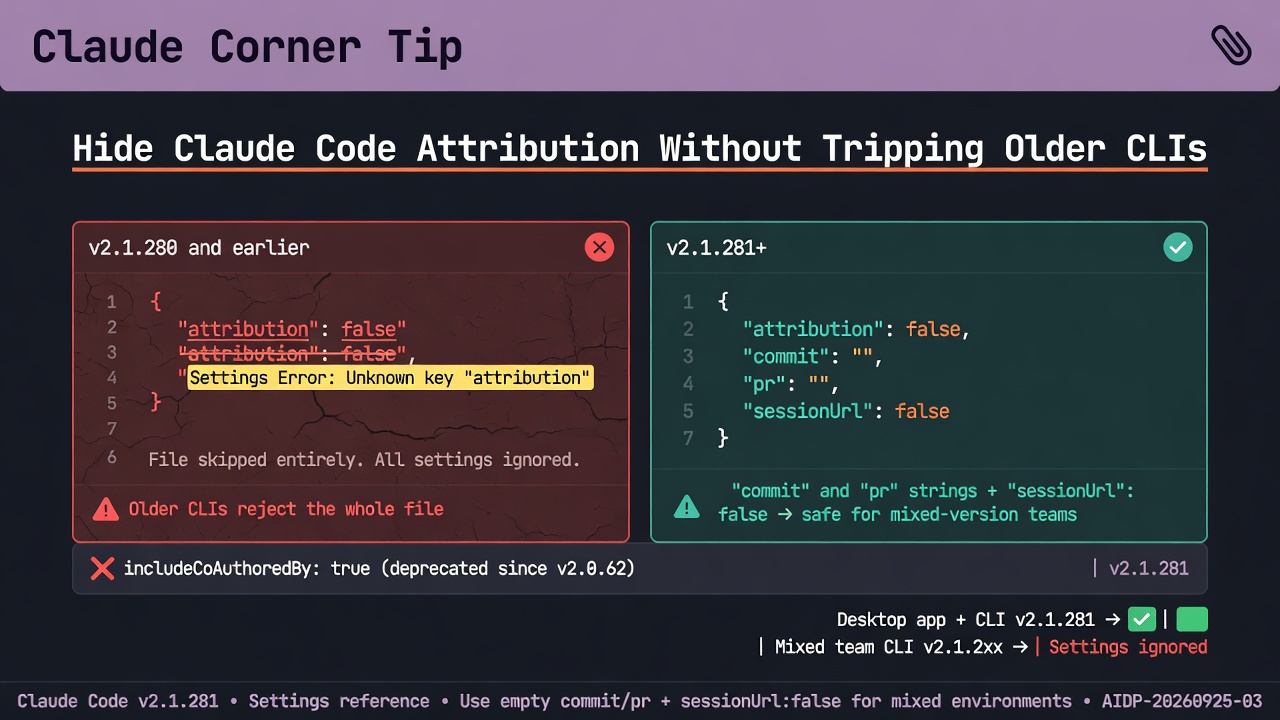
At a glance
Claude Corner tip- Confirm every Claude Code CLI that reads the file is on v2.1.281 or later before you set `”attribution”: false`.
- On a mixed-version team, hide the stamps with empty `commit` and `pr` strings plus `”sessionUrl”: false`.
- Move off `includeCoAuthoredBy`, which has been deprecated since `attribution` replaced it in v2.0.62.
Claude Code v2.1.281 added `”attribution”: false` to hide all commit and pull request attribution, and it is tempting to drop it into a shared `.claude/settings.json`. Earlier versions reject the boolean and skip the whole user, project, or local settings file that holds it, so every other key in that file goes with the stamp. Because the Desktop app reads the same settings files as the CLI, one committed file can behave differently depending on which version each teammate runs.
Why it matters
By default, commits get a `Co-Authored-By` trailer naming the session’s active model and pull requests get a “Generated with Claude Code” line, while cloud and Remote Control sessions also append a claude.ai session link. A rejected value is a Settings Error, not a warning. Interactive sessions open a dialog, but a `claude -p` run shows no dialog and continues without the broken file, so a scripted job can lose every other setting that lived next to the boolean. The legacy key adds a second trap, because once you set `attribution.commit` or `attribution.pr`, Claude Code ignores `includeCoAuthoredBy` and uses its default text for whichever half you left unset.
How to hide attribution on a mixed-version team
1. Check the Claude Code version on every machine that reads the shared file. The docs do not say how to check the Desktop app’s CLI version, so treat Desktop users as unconfirmed. 2. Open your user, project, and local settings files, then search each for `attribution` and `includeCoAuthoredBy`. 3. If any machine is below v2.1.281 or unconfirmed, use the object form below, which the docs recommend for files earlier versions also read. Save the boolean for when every binary is v2.1.281 or later. 4. To replace the stamp instead of hiding it, put your own byline in `commit` and set `pr` as well, even if only to `””`, because an unset half falls back to the default text. 5. Remove `includeCoAuthoredBy` once `attribution` is in place. Claude Code still reads it, but new configurations should set `attribution`. 6. Start a new interactive session. If a Settings Error dialog appears (invalid JSON triggers it too), continue, then run `/status` to see the affected files and `claude doctor` for each error’s details. 7. Make one test commit and pull request from Claude Code and read the message bodies.
Gotchas
- `sessionUrl` arrived in v2.1.183 and only affects commits and pull requests from cloud and Remote Control sessions. The docs do not say how versions before v2.1.183 treat the key, so test the snippet on your oldest CLI.
- Managed settings behave differently. If a managed file holds `”attribution”: false`, an older binary drops only that key and keeps enforcing the rest, which is not the same as hiding attribution everywhere.
- A CLAUDE.md or memory rule about attribution takes precedence over these commit and PR lines, unless the line is set in managed settings.
Recommended AI prompt
Copy this paragraph into ChatGPT, Claude, Gemini, Grok, or whatever you use.
I use Claude Code in the terminal and the Claude Desktop app, and I want to hide the commit trailer and pull request line it adds without breaking teammates on older versions. Anthropic’s settings reference says `”attribution”: false` needs v2.1.281 or later and earlier versions skip the whole settings file that holds it, so shared files should set `attribution.commit` and `attribution.pr` to empty strings and `attribution.sessionUrl` to false instead. Help me audit my user, project, and local settings files for `attribution` and the deprecated `includeCoAuthoredBy`, choose the right JSON for a team whose versions I may not fully know, and plan a check with one test commit and pull request, flagging anything you are unsure of rather than inventing settings keys or version behavior.
Sources
- Settings reference (attribution)
- Claude Code changelog
- Claude Code v2.1.281 release
- Claude Code Desktop
- Settings reference (attribution)
- Fix a broken settings file
- Settings reference (attribution)
- Fix a broken settings file
- Debug your config
- Claude Code changelog
- Managed settings
- Settings reference (attribution)
Recommended AI prompt
Explore each Top Story in Grok. Links open in a new tab. On phones, the same link may open the Grok app if you have it installed (via your device's normal link handling).
Article: Claude Code Attribution False Makes Older CLIs Ignore the Whole Settings File
Privacy: links open grok.com in your session only. AIDevPulse does not run your prompts through our API.