
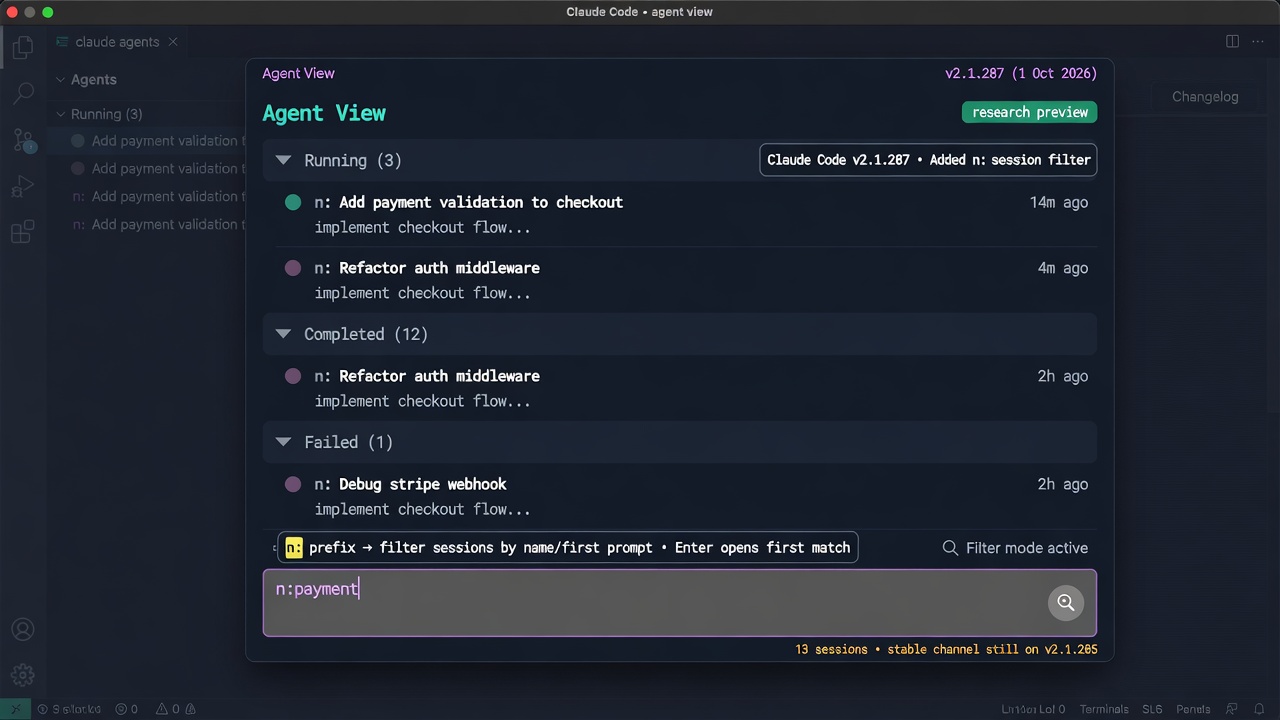
At a glance
Claude Corner tip- In Claude Code agent view, every prompt you type at the bottom starts a new session, so retyping a word to find an old session creates a duplicate instead.
- Claude Code v2.1.287 (1 Oct 2026) adds an
n:prefix that turns the same box into a filter on session names and first prompts, and Enter opens the first match. - Agent view is a research preview, and on 2 Oct 2026 the npm
stablechannel is still v2.1.285, so a stable install does not have the filter yet.
In agent view, the box at the bottom is a dispatcher. Typing a word you remember from a session and pressing Enter starts a brand new session instead of finding the old one. The n: prefix tells Claude Code you are searching, not dispatching.
Why it matters
Agent view, opened with claude agents, lists your background sessions grouped by state, and Claude writes each session a short name from its prompt. A few dispatches in, the session you want could sit in any group, perhaps collapsed, under a name you do not remember. The docs say every prompt entered at the bottom starts its own new session, never a follow-up to an existing one, and each session uses your subscription quota independently. Before v2.1.287 the filters matched an agent name, a state, a result, or a pull request, not the session title, so a duplicate costs usage and leaves two rows to reconcile. The fix is one prefix typed before the same word.
How to find a session without starting one
This is the Claude Code terminal screen, not /agents, which since v2.1.198 only prints a reminder about managing subagents.
- Run
claude --versionand confirm it prints v2.1.287 or later. A machine on the stable channel does not have the filter yet. - Run
claude agents. In an untrusted folder, Claude Code asks for workspace trust first. - In the input, type
n:followed by the text. The docs say it matches sessions whose name or first prompt contains the text. In a local check on v2.1.287,n:CHECKfound a session namedcheckout, so the match ignored case and worked inside a word. - Watch the hint under the input. In that check it read “enter to open” with a filter active and “enter to create” with a plain prompt, though a research preview can change that wording. Press Enter on “open” to attach to the first match, which is selected for you.
- Combine terms with spaces, starting the line with an
a:,s:,n:, oro:filter. Every term must match.
The second line lists only the sessions waiting on you whose name or first prompt contains checkout. Start the line with the prefix, because in the local check check n:check showed “enter to create”.
Gotchas
- The filter reads the session name and first prompt only, as documented. If the word appears later in the transcript,
o:searches reported results, or you can open rows and look. - Names are easier to hit when you choose them. Select a row and press Ctrl+R to rename it, and the new name persists across restarts.
- A prompt shorter than four characters is rejected with a “Too short” hint instead of dispatching, so a stray keystroke does not start a session.
- A plain word that is also a slash command, such as
login, makes the input suggest that command, which is another reason to type then:prefix first. - The Desktop Code tab is a different surface. The docs describe filtering its sidebar by status, project, or environment, and they do not describe agent view or
n:there, so do not expect the prefix in the Desktop prompt box. - The local checks ran on Linux without signing in, and I did not test Desktop, VS Code, or pressing Enter on a filtered row, so confirm the open step on your own machine.
Recommended AI prompt
Copy this paragraph into ChatGPT, Claude, Gemini, Grok, or whatever AI you use.
I use Claude Code agent view with claude agents and keep starting duplicate sessions when I retype a word to find an old one. Explain how to use the n: filter, which needs Claude Code v2.1.287 or later, to find a session by name or first prompt before pressing Enter. Give me a two-minute test with two sessions that shows the filter working and a plain word starting a new session, say what the hint under the input reads in each case, and note that the Desktop Code tab uses its sidebar filters instead. Do not invent keys or flags, and ask me for the output of claude --version if you are unsure which version I have.
Sources
Recommended AI prompt
Explore each Top Story in Grok. Links open in a new tab. On phones, the same link may open the Grok app if you have it installed (via your device's normal link handling).
Article: Claude Code v2.1.287 n: Prefix Searches Agent Sessions Instead of Starting Them
Privacy: links open grok.com in your session only. AIDevPulse does not run your prompts through our API.