
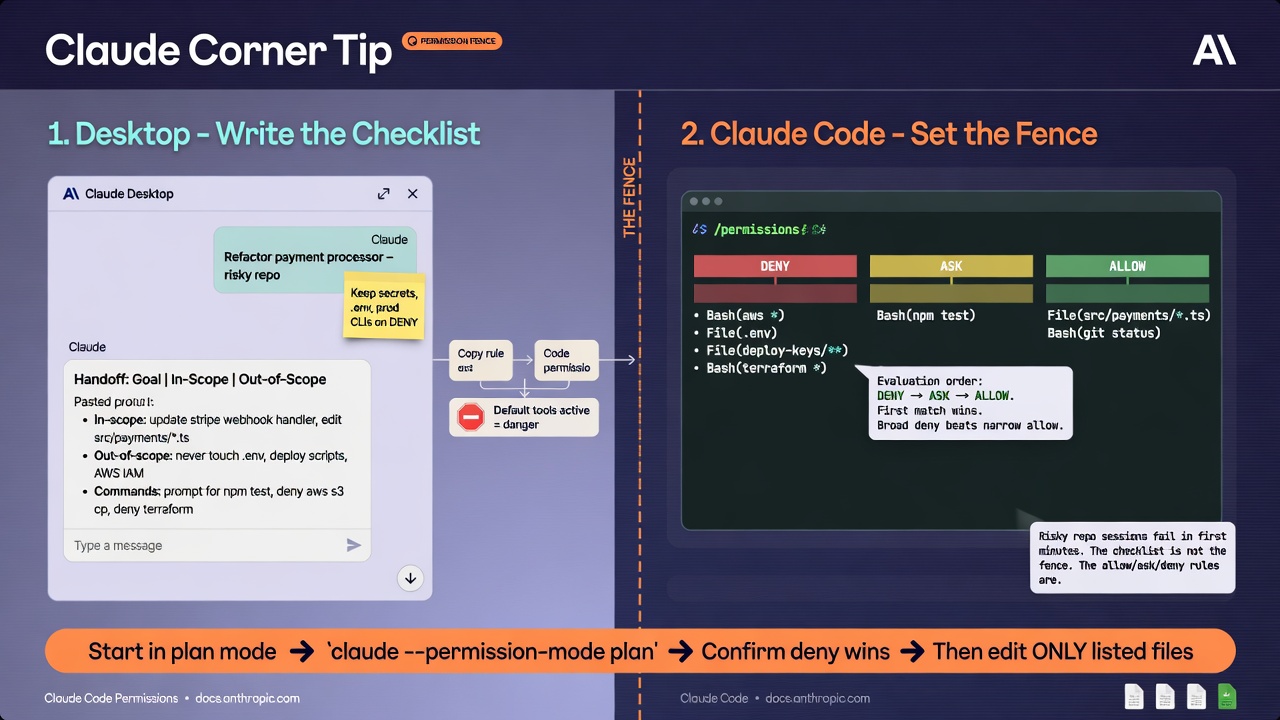
At a glance
Claude Corner tip- Turn the risky task into a short in-scope / out-of-scope checklist in Claude Desktop before any edit.
- In Claude Code, open `/permissions` and set explicit allow, ask, and deny rules while still in plan mode.
- Confirm deny wins, then leave plan mode only for the files and commands on that list.
A risky repo session fails in the first five minutes, not at the last commit. Claude Code can read files, run shell, and edit the tree as soon as the session starts. Claude Desktop is where you freeze the scope. Claude Code is where you enforce it. The checklist is not the fence. The allow, ask, and deny rules are.
Why it matters
Claude Code evaluates permission rules in a fixed order: deny, then ask, then allow. The first match wins. Specificity does not change that order, so a broad deny such as `Bash(aws )` blocks a narrower allow such as `Bash(aws s3 ls)`. User, shared-repo, and personal-repo settings all merge; if a tool is denied at any level, no other level can allow it. Write the scope in Claude Desktop, then copy only the fence into Claude Code. Do not edit while tools are still on product defaults.
How to set the permission fence before the first edit
1. Open Claude Desktop. Start a focused chat, or a Project if the checklist should live next to attached files. 2. Paste the repo risk and the task. Ask for a one-screen handoff: goal, in-scope and out-of-scope paths, unattended vs prompt vs never-run commands. Keep secrets, `.env`, deploy keys, and production cloud CLIs on deny unless the task is about those files. 3. In the repo, start Claude Code in plan mode: `claude –permission-mode plan`. You can also set `defaultMode` to `plan` under permissions in a settings file. 4. Run `/permissions`. Add and remove rules in the dialog, or write the same lists into `.claude/settings.local.json` for this repo, or `~/.claude/settings.json` to follow you across repos. Changes apply on the next tool call. 5. Save a tight fence. Allow only checklist read-only or test commands. Ask on anything that leaves the machine (`git push`, deploy, package publish). Deny secret files and outbound fetch wrappers. Shared allow rules wait on workspace trust; deny and ask restrict immediately.
Verify before edits. Re-open `/permissions` and match each rule to the Desktop checklist. Still in plan mode, ask Claude Code to read `.env` and run `curl`; both should fail closed. Only then leave plan mode and point it at the in-scope paths.
Gotchas
- Rules are enforced by Claude Code, not the model. A prompt that says you may edit `.env` does not override a deny.
- A bare Bash deny removes the tool from context; a scoped deny such as `Bash(curl:)` leaves Bash available and blocks matching calls.
- Bash patterns are prefix matches and can be bypassed. Keep dangerous verbs on deny or ask; do not treat an allow list as a sandbox.
- Compound commands split on `&&`, `||`, `;`, and `|`. An allow on the first half does not approve the second half.
- Skip `–dangerously-skip-permissions` and `bypassPermissions` on a risky repo. If checklist and `/permissions` disagree, the dialog wins.
Recommended AI prompt
Copy this paragraph into ChatGPT, Claude, Gemini, Grok, or whatever you use.
You are reviewing a Claude Code permission fence before any repo edits. I will paste my Claude Desktop scope checklist, the current `/permissions` list (with which settings.json file each rule came from), and `.claude/settings.local.json` or `~/.claude/settings.json` if I have it. Map every checklist item to an allow, ask, or deny rule using Tool or Tool(specifier) syntax. Flag gaps: readable secret files, allowed network tools, git push or cloud CLIs with no ask/deny, and allows that cannot override a broader deny. Restate evaluation order (deny, then ask, then allow; first match wins). Say whether the fence belongs in `.claude/settings.local.json` or `~/.claude/settings.json`. Give a plan-mode verification script in words, then return a rewritten settings.permissions block, a short pass/fail table, and the first sentence I should type in Claude Code after the fence is confirmed. Do not invent Claude Code features or URLs.
Recommended AI prompt
Explore each Top Story in Grok. Links open in a new tab. On phones, the same link may open the Grok app if you have it installed (via your device's normal link handling).
Article: Set Claude Code Deny Ask and Allow Rules Before the First Edit
Privacy: links open grok.com in your session only. AIDevPulse does not run your prompts through our API.
1 thought on “Set Claude Code Deny Ask and Allow Rules Before the First Edit”