
At a glance
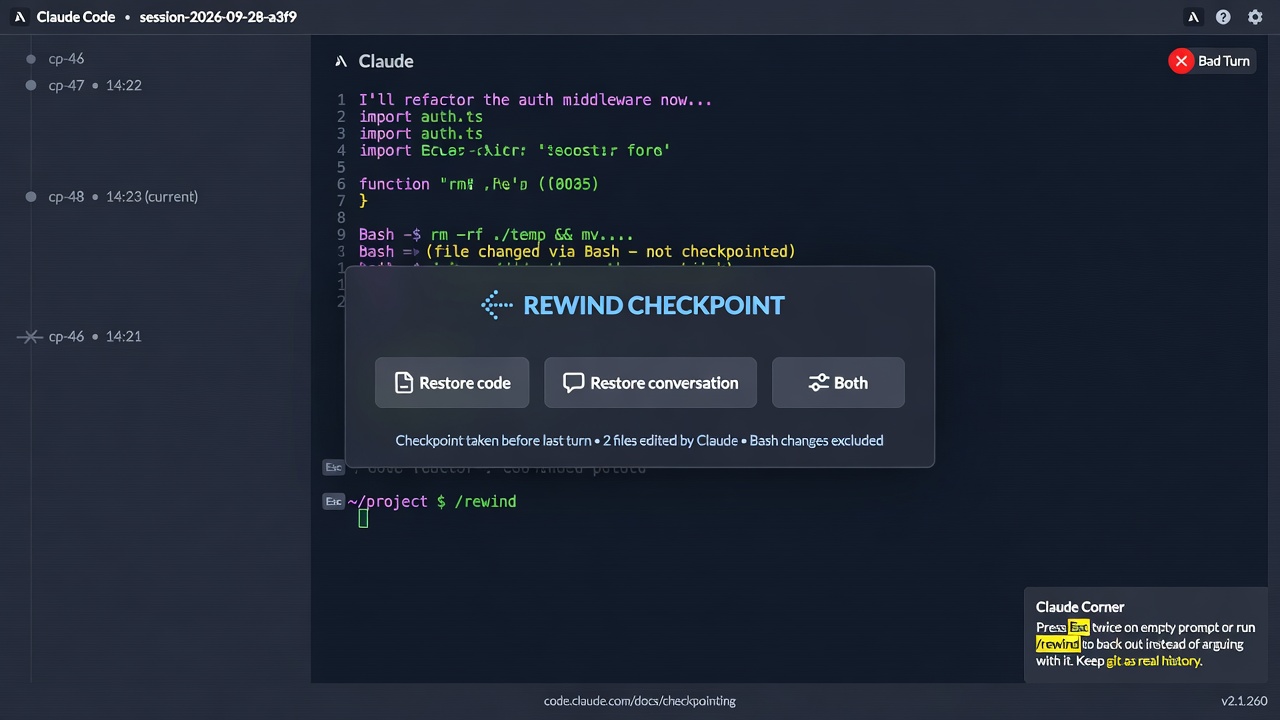
Claude Corner tip- Press Esc twice on an empty prompt, or run
/rewind, to back out of a bad Claude Code turn instead of correcting it. - Choose Restore code, Restore conversation, or both, knowing that files changed through Bash and most subagent edits are not in the checkpoint.
- Run v2.1.260 or later so a restore with missing backups fails loudly, and raise
cleanupPeriodDaysif you rewind older sessions.
When Claude Code takes a wrong turn, the instinct is to reply “no, undo that and try again.” Anthropic’s error reference says rewinding usually works better, because a correction keeps the wrong attempt in context where it can anchor later answers. The CLI captures a checkpoint before every prompt that starts a turn, so a clean retry is usually two keystrokes away.
Why it matters
Claude Code keeps file snapshots for the 100 most recent checkpoints in a session and saves them with the conversation, so /rewind still works after you resume. The catch is scope, because only direct edits made through Claude’s file editing tools are tracked. Any file Claude changed by running a Bash command stays changed after a rewind, most subagent edits are not captured, and neither are changes you or another session made outside this one. Symlinked and hard-linked files are not rewound either. Treat checkpoints as quick session-level recovery for Claude’s own edits, and keep git as your real version history.
How to rewind a bad turn
- Check your version with
claude --version. Since v2.1.216 a restore skips symlinks and hard links at tracked paths and reports how many it skipped, and since v2.1.260 a restore whose backups are missing says “No files were restored” instead of appearing to succeed. - When a turn goes wrong, clear the prompt input and press Esc twice, or run
/rewind(its aliases are/checkpointand/undo). If the input still has text, double Esc clears it and saves the draft to your input history. - Select the prompt that started the bad turn. Pick Restore code and conversation for a clean retry, Restore code to keep the discussion while dropping the edits, or Restore conversation to keep the files and rephrase. The two code options appear only when that checkpoint has tracked file changes to revert.
- After a conversation restore, your original prompt returns to the input, so add what it was missing and resend it.
- Run the check below to spot what the rewind could not undo. Git lists every uncommitted change, including edits from turns before the checkpoint you kept, so compare it with what you expected at that checkpoint before reverting anything with git or by hand.
- To compare two approaches without losing the first, use
/branchorclaude --continue --fork-sessioninstead of rewinding, since both leave the original session intact.
Gotchas
- The retention sweep deletes a session’s snapshots about 30 days after it last saved one. Raise
cleanupPeriodDays(a whole number, minimum 1, default 30) in a settings file if you rewind older sessions, noting that it also keeps transcripts longer and that0fails validation. - A message you queue while Claude is working joins the running turn and gets no checkpoint of its own, so rewind to the prompt that started that turn.
- Rewind is unavailable in non-interactive
-pmode, where the docs suggest retrying with a rephrased prompt in a new session.
Recommended AI prompt
Copy this paragraph into ChatGPT, Claude, Gemini, Grok, or whatever AI you use.
I use Claude Code in the terminal and want my team to undo bad agent turns with checkpoints instead of typing corrections on top of them. Anthropic’s checkpointing docs say that pressing Esc twice on an empty prompt or running /rewind opens a menu that restores code, conversation, or both from any prompt that started a turn, but files changed through Bash, most subagent edits, changes made outside the session, and symlinked or hard-linked files are not restored, and snapshots are swept after cleanupPeriodDays, which defaults to 30. Write a one-page team checklist that covers when to rewind versus branch with /branch, how to verify with git status after a restore, which projects deserve a longer cleanupPeriodDays, and how to explain the Bash gap to new teammates, flagging anything you are unsure of rather than inventing commands or settings keys.
Sources
Recommended AI prompt
Explore each Top Story in Grok. Links open in a new tab. On phones, the same link may open the Grok app if you have it installed (via your device's normal link handling).
Article: Claude Code Rewind Beats Corrections but Misses Bash and Subagent Edits
Privacy: links open grok.com in your session only. AIDevPulse does not run your prompts through our API.
1 thought on “Claude Code Rewind Beats Corrections but Misses Bash and Subagent Edits”