
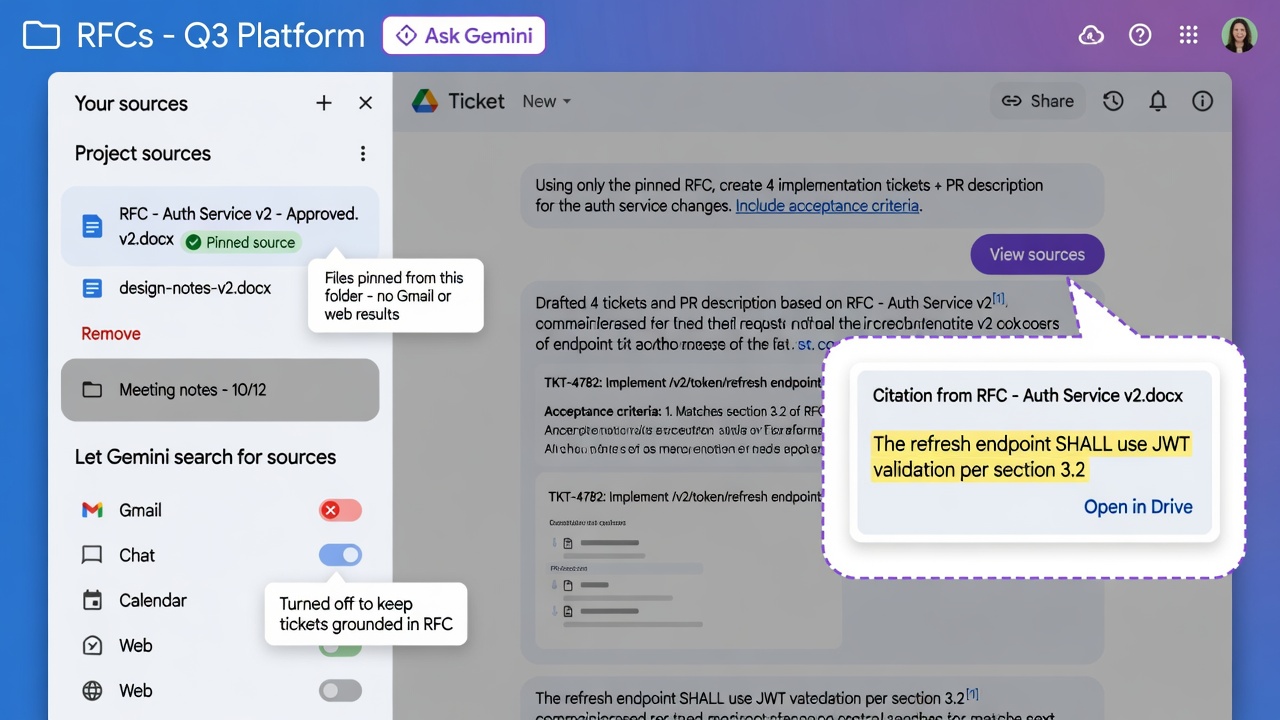
At a glance
Gemini Tip
- Open Ask Gemini from the RFC folder so those files land as pinned sources, not a vague Workspace search.
- Trim sources and search locations so Gmail, Chat, Calendar, and the web stay out of the ticket draft.
- Prompt for implementation tickets plus a PR description, then verify every citation against the RFC Doc.
You paste an RFC into chat, get tickets that invent endpoints, then paste the same RFC tomorrow and get a different split. The spec already lives in Drive. Ask Gemini can pin that Google Doc (or its folder) as a source so tickets and PR copy stay grounded in the file you approved.
Why it matters
Tickets drift when Gemini answers from whatever it can see instead of the RFC. Google documents sources as files you add so Gemini prioritizes those files for the whole conversation. Opening Ask Gemini from a Drive folder lists the selected files as sources. Starting from scratch turns Drive, Gmail, Chat, and Calendar search on by default. The one move: pin the RFC, uncheck extra search locations, prompt for tickets and a PR description, then hover the citation numbers and open the original Doc.
How to pin the RFC and draft tickets
Use Ask Gemini in Google Drive on the computer.
1. Put the approved RFC Google Doc (and only the design notes you want in scope) in a Drive folder. 2. Go to drive.google.com, open that folder, and in the toolbar click Ask Gemini. Drive opens a full-screen workspace with those files listed as sources. 3. Under Your sources or Project sources, keep the RFC checked. Hover and Remove files that should not shape tickets. Suggested files are unused until you click Add. 4. If Let Gemini search for sources is on, uncheck Gmail, Chat, Calendar, and Web. Leave wider Drive search off unless you want Gemini to roam beyond the RFC. 5. Paste the prompt below. Hover each citation number, click the file chip, and confirm the RFC heading. Then click Export to Docs (saves to My Drive root).
Already in the RFC in Google Docs? Click Ask Gemini, then Add sources → Add from Drive (or type @ and pick the file).
Gotchas
- Ask Gemini in Drive needs an eligible plan. Google’s table lists Business Standard, Business Plus, Enterprise Standard, and Enterprise Plus (not Starter). Look for the Ask Gemini icon, or ask your admin.
- You need view access on every source. Missing access shows You need access to some files. PDFs must already be in Drive.
- Gemini may still use admin-enabled app data to prioritize among sources. Pinning is not a legal hold. Start a new conversation if an old source is still in play.
- Too many sources can exceed the context window. Citations can miss, mis-cite, or invent a source. Open the RFC before you file tickets.
- Export to Docs lands in My Drive root. Move it into the project folder after you check it.
Recommended AI prompt
Copy this paragraph into ChatGPT, Claude, Gemini, Grok, or whatever you use.
Help me turn an approved RFC Google Doc into implementation tickets and a PR description in Ask Gemini in Google Drive. Open the RFC folder at drive.google.com, click Ask Gemini so those files land as sources, Remove out-of-scope files, uncheck Gmail/Chat/Calendar/Web search, prompt for tickets plus a PR description with citations, open each cited Doc, then Export to Docs. Ask me for the RFC path, extra pinned files, and ticket tool. Return a verify checklist: folder open, sources trimmed, search off, citations opened, export moved into the project folder. Desktop and Workspace only (no API or curl).
Sources
- Use Gemini in Drive for research & analysis
- Learn how to use sources with Google Workspace with Gemini
- Get started with Gemini in Google Drive
- Create Content, Images & Audio Overviews with Gemini in Drive
- Collaborate with Gemini in Google Docs
- Write & edit with Gemini in Docs
- Get started with Google Workspace with Gemini
- Learn how to use sources with Google Workspace with Gemini
Recommended AI prompt
Explore each Top Story in Grok. Links open in a new tab. On phones, the same link may open the Grok app if you have it installed (via your device's normal link handling).
Article: Pin the RFC in Ask Gemini So Tickets and PRs Cite the Spec
Privacy: links open grok.com in your session only. AIDevPulse does not run your prompts through our API.