
At a glance
Claude Corner tip
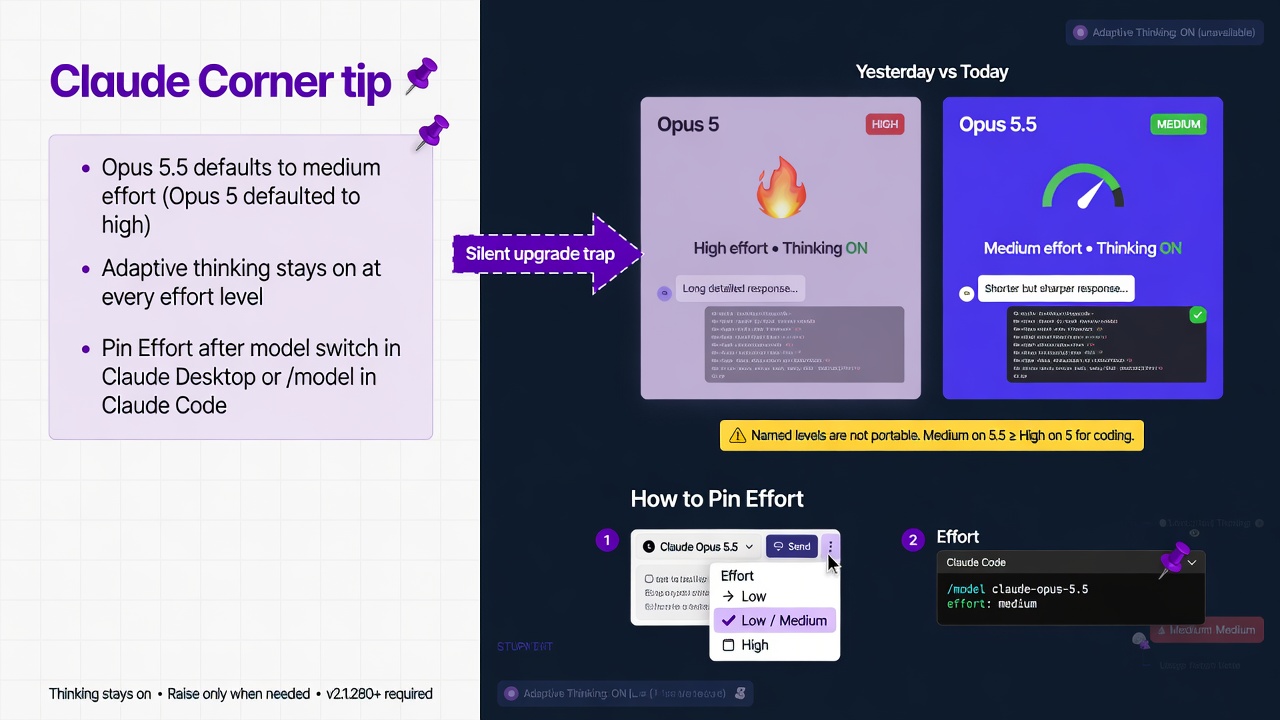
- Opus 5.5 defaults to medium effort (Opus 5 defaulted to high), so a silent upgrade can feel softer than expected.
- Adaptive thinking stays on at every effort level on Opus 5.5; effort is the lever for depth, latency, and usage burn.
- After you change the model in Claude Desktop or run `/model` in Claude Code (v2.1.280+), pin Effort so upgrades do not inherit old high habits or soft-default unnoticed.
Switching to Claude Opus 5.5 is not a silent upgrade of the same session. Change only the model in Claude Desktop, or run `/model` in Claude Code, and you can keep yesterday’s quality assumption while today’s default sits one level lower. Pin effort right after the switch.
Why it matters
Opus 5.5 starts at medium. Opus 5 and earlier Opus models started at high, so a session that never sets effort runs one named level lower than before. On Opus 5.5, thinking stays on in the Claude apps; effort scales how hard the model works, turn length, and usage burn. Named levels are not portable: Anthropic’s testing says Opus 5.5 at medium matches or exceeds Opus 5 at high on coding evaluations, and at the same named level Opus 5.5 tends to think more per turn. Start at medium. Raise only where your own work shows a gain.
How to pin effort after you change the model
Primary surface is Claude Desktop and Claude Code, not the Messages API. Claude Code needs v2.1.280 or later.
Claude Desktop
1. Open a chat and click the model name next to the send button. 2. Choose Claude Opus 5.5, then click Effort and pick a level (Default on Opus 5.5 is medium). 3. Thinking stays on; there is no off-switch. Re-check Effort after every model change in that chat.
Start Low or Medium for routine work; High when needed; xhigh for long-running coding where available; Max when correctness beats turn time.
Claude Code (v2.1.280+)
1. Confirm `claude –version` reports v2.1.280 or later. 2. Switch with `/model` (or `/model claude-opus-5-5`), then pin with the effort slider or `/effort medium` (also high, xhigh). 3. `/effort auto` clears a saved level and returns this model to its default (medium on Opus 5.5). 4. One launch: `claude –effort medium`. A `/effort` pin persists (low through xhigh); Max is session-only unless you set `CLAUDE_CODE_EFFORT_LEVEL`. 5. Persist under `modelSettings` with `effortLevel` on that model key (for example `claude-opus-5-5`). A leftover top-level user-settings `effortLevel` does not apply to Opus 5.5. Optional: `CLAUDE_CODE_EFFORT_LEVEL=medium` (or `auto`). Levels: low, medium, high, xhigh, max.
Gotchas
- On Opus 5.5, thinking stays on; effort scales the work.
- Carrying Opus 5’s high onto Opus 5.5 is usually more thinking, not a like-for-like quality lock.
- Admins can hide models or cap effort; a missing level is often policy.
- Skill or subagent frontmatter can override session effort while that skill runs.
Recommended AI prompt
Copy this paragraph into ChatGPT, Claude, Gemini, Grok, or whatever you use.
I just switched to Claude Opus 5.5. Default effort is medium and adaptive thinking is always on. Walk my Claude Desktop chat and my Claude Code session on v2.1.280 or later. In Desktop, tell me what to click next to Send to confirm Opus 5.5 and pin effort, and remind me thinking cannot be turned off. In Claude Code, give exact `/model` and `/effort` commands to pin a level, how `/effort auto` differs from a named level, when to use `–effort` or `CLAUDE_CODE_EFFORT_LEVEL`, and why a top-level user-settings `effortLevel` will not apply. Recommend one daily pin and one escalation level, given that Opus 5.5 at medium already matches or beats Opus 5 at high on coding evaluations and the same named level on 5.5 tends to think more per turn. Keep it as a short checklist I can run in under five minutes.
Recommended AI prompt
Explore each Top Story in Grok. Links open in a new tab. On phones, the same link may open the Grok app if you have it installed (via your device's normal link handling).
Article: Claude Opus 5.5 Defaults to Medium Effort So Pin It After Switching
Privacy: links open grok.com in your session only. AIDevPulse does not run your prompts through our API.