
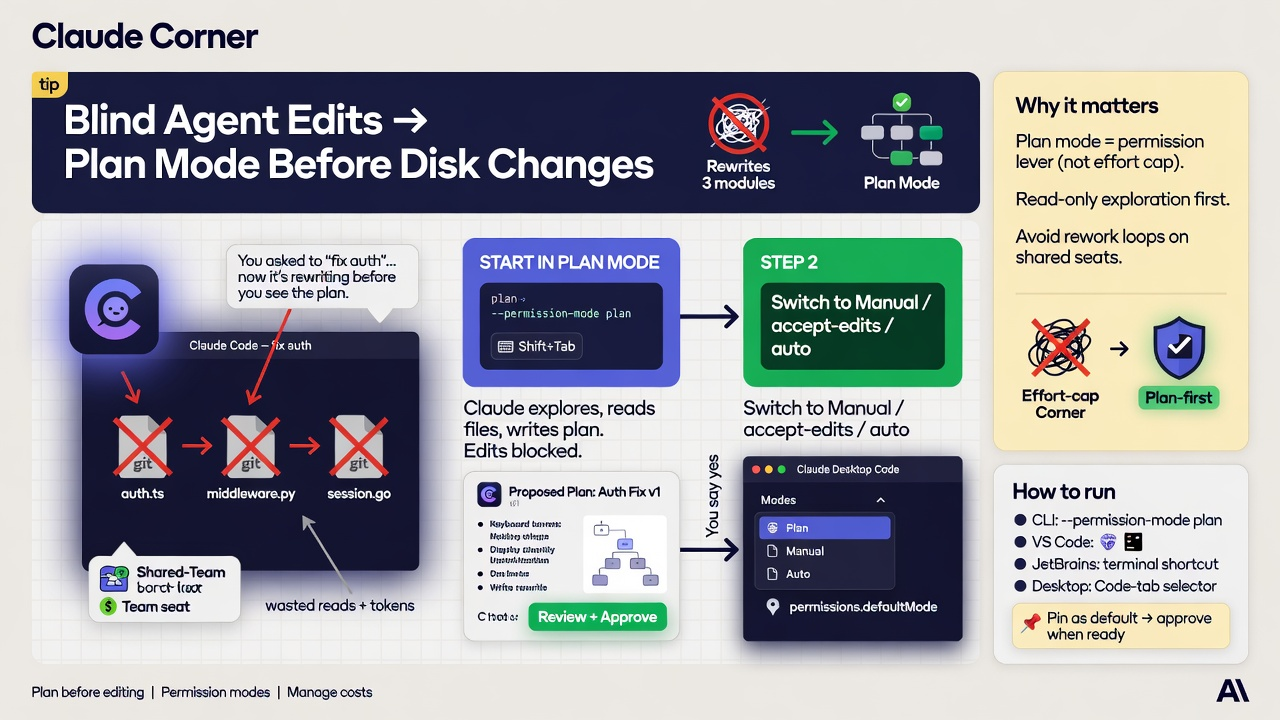
- Start Claude Code in plan mode (
--permission-mode planorShift+Tab) so it explores and proposes without editing until you approve. - Pin plan as the project default with
permissions.defaultMode, then approve into Manual, accept-edits, or auto when the plan is ready. - Use Desktop's Code-tab mode selector the same way when you are not in the terminal, and treat plan-first as the cheap way to avoid rework loops.
You ask Claude Code to "fix auth," and it starts rewriting three modules before you see the approach. On a shared Team seat that is not just messy git. It is wasted reads, wasted tools, and a second pass when the first direction was wrong. Plan mode flips the order: research and propose first, touch disk only after you say yes.
Why it matters
Anthropic's cost guidance calls out plan mode for complex work because a wrong first direction burns tokens on repair. Plan mode is a permission mode, not an effort dial: Claude can read files, explore read-only, and write a plan, while source edits stay blocked until you approve. That is a different lever from the Claude Code effort-cap Corner, which caps how hard a session thinks. Use plan when the risk is premature edits, and effort caps when the risk is quota burn on already-approved work. The one move: start big changes in plan, review (edit in your editor if needed), then approve into the mode you want for implementation.
How to run plan mode before edits
Plan mode works in Claude Code CLI, JetBrains (same terminal shortcuts), VS Code (mode indicator), and Claude Desktop's Code tab (mode selector beside send). CLI status target: ⏸ plan mode on.
- 1. For one session:
claude --permission-mode plan. Mid-session, pressShift+Tab(orAlt+Mon some Windows terminals) until the status bar shows plan mode. For a single prompt without changing the session mode, prefix with/plan. - 2. Give a scoped task ("refactor login rate limits; do not touch billing"). Claude explores and writes a plan. It should not edit source while plan mode is active.
- 3. When the plan appears: keep planning if wrong; approve and manually review each edit; or approve into auto / accept-edits when offered. Press
Ctrl+Gto open the plan in your default editor before approval. - 4. Make plan the default for terminal sessions in a repo with
permissions.defaultMode: "plan"in.claude/settings.json. Override one launch with--permission-mode. In Desktop's Code tab, pick Plan from the mode selector (Plan is session-only; other modes can stick per folder). - 5. After approval, implement, then
/clearbefore the next unrelated task so planning context does not tax later turns.
# Explore and plan only (no source edits until you approve)
claude --permission-mode plan

# Mid-session: Shift+Tab until status shows "plan mode on"
# Single prompt: /plan redesign the retry queue without touching auth

mkdir -p .claude
cat > .claude/settings.json <<'JSON'
{
  "permissions": {
    "defaultMode": "plan"
  }
}
JSON

# Optional: start in plan, keep bypassPermissions in the Shift+Tab cycle
# for later (isolated containers/VMs only; not a normal laptop)
# claude --permission-mode plan --allow-dangerously-skip-permissions

# After approve choices or Shift+Tab, leave plan mode.
# Desktop Code tab: mode selector next to send.
Gotchas
- Plan mode blocks source edits until you approve. Read-only exploration still runs. With
useAutoModeDuringPlanleft on (default), the classifier can approve some shell commands during planning; set itfalseif you want every non-read-only command to prompt. - Approving a plan exits plan mode into the mode that approve option describes. To plan again,
Shift+Tabback or prefix/plan. - Project
defaultMode: "plan"applies to terminal sessions. VS Code usesclaudeCode.initialPermissionMode(or the mode indicator) and does not take the starting mode from the project's.claude/settings.json. - Plan decides when disk changes are allowed. Effort decides how expensive each turn is. Pair them; do not swap them.
bypassPermissionsis for isolated containers/VMs. Prefer normal plan mode on day-to-day machines.
Recommended AI prompt
Copy this paragraph into ChatGPT, Claude, Gemini, Grok, or whatever you use.
You are helping a team adopt Claude Code plan mode so agents research and propose before editing. Use current Claude Code docs (permission modes, interactive mode, costs, CLI reference). Produce a checklist covering --permission-mode plan, Shift+Tab / Alt+M, /plan, status bar plan mode on, approve options (keep planning, manual edits, auto or accept-edits), Ctrl+G plan editing, permissions.defaultMode in .claude/settings.json, Desktop Code-tab mode selector, VS Code mode indicator differences, and how plan mode differs from effort caps. End with a sample settings snippet using only documented keys. Do not invent Messages API request fields.
Sources: Plan before editing · Permission modes · Manage costs · Interactive mode · Settings reference
2 thoughts on “Claude Corner: Blind Agent Edits → Plan Mode Before Disk Changes”