
At a glance
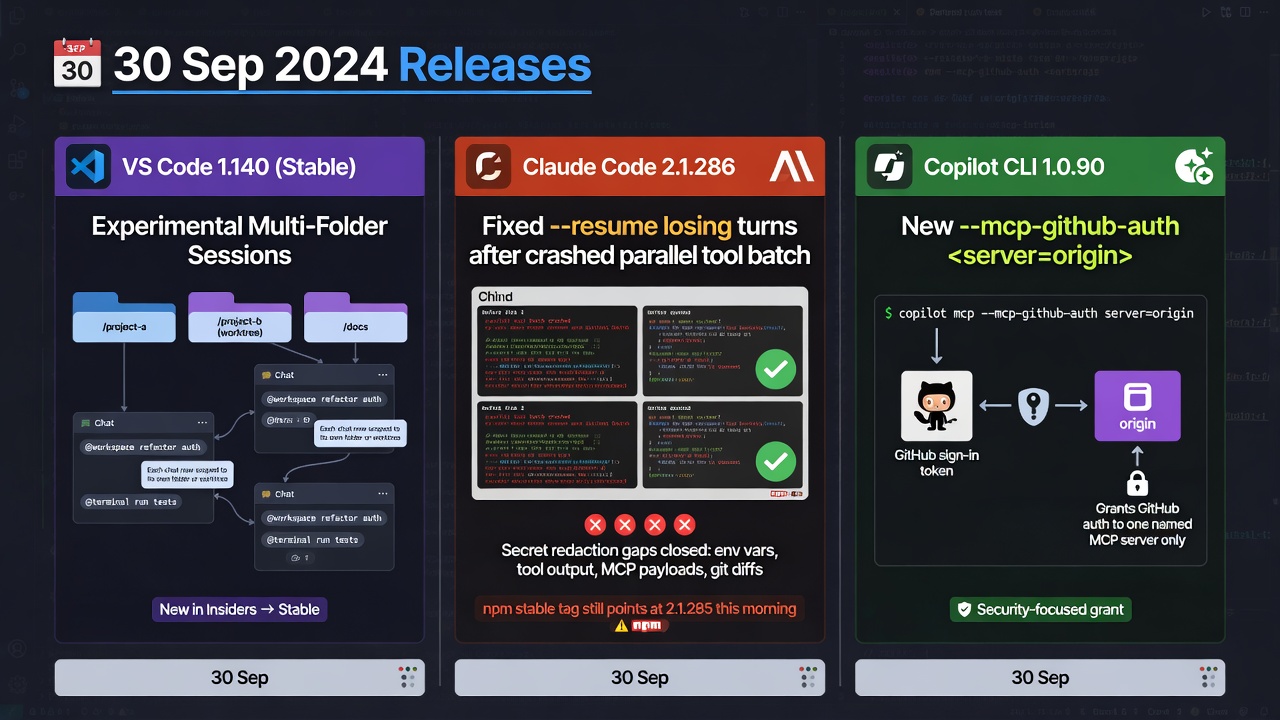
- VS Code 1.140 (stable, 30 Sep) adds experimental multi-folder sessions, so each chat in one agent session can work in its own folder or worktree.
- Claude Code 2.1.286 (30 Sep) stops
--resumefrom sometimes losing turns after a crashed parallel tool batch and closes four secret-redaction gaps, but npm'sstabletag still points at 2.1.285 this morning. - Copilot CLI 1.0.90 (30 Sep) adds
--mcp-github-auth <server=origin>, a grant that sends your GitHub sign-in to one named MCP server.
None of today’s changes is a new model. They decide which folder a chat writes in, whether a resumed Claude Code session keeps its turns, and which MCP server receives your GitHub sign-in, so the work is checking versions and scoping access.
Treat today as the day you turn multi-folder on only for a session that has to touch two checkouts, check which Claude Code version your channel installs before the next --resume, and grant --mcp-github-auth to one named server at a time.
Top Stories
1. VS Code 1.140 can give each chat its own folder, as an experiment
VS Code 1.140 went stable on 30 Sep. Its Copilot harness now runs on the Copilot SDK inside a dedicated agent host process, so one session can be open from several VS Code windows. The change that matters at a desk is multi-folder sessions. Before 1.140 every chat in a multi-chat session shared one folder and one checkout, and now each chat keeps its own terminal, tasks, changes, pull request and Agent merge state for its folder or worktree, while chats on the same folder still share them.
The feature is experimental and off by default, and its settings are not in the Settings editor. Put the one for your harness in your user settings.json and start a new session: chat.agentHost.copilotAgent.multiRootEnabled, chat.agentHost.claudeAgent.multiRootEnabled or chat.agentHost.codexAgent.multiRootEnabled. There is no UI for choosing a peer chat’s folder, so you ask the main chat to create the peer and describe the repository or worktree it should use. Two other experimental pieces ship beside it. Remote delegation (chat.remoteAgentHostsEnabled plus chat.remoteSessions.tools.enabled, Agents window only) lets an agent start sessions on connected hosts without cloning your workspace there, and git.worktreeSymlinkFolders symlinks matching ignored folders such as node_modules/ into new worktrees, so an install in one changes every linked checkout.
Practical dev impact: The setting alone does not isolate anything, because two chats that land on the same folder still edit the same files, so name the repository or worktree in the prompt. VS Code’s docs say worktree sessions run with Allow all and that a worktree is not a security boundary, and the release notes do not say whether peer-chat worktrees follow that, so check what permission level the peer actually has. Leave remote delegation off unless a connected host already has a trusted folder for the repository, and skip the node_modules/ symlink for agent worktrees that run install scripts.
2. Claude Code 2.1.286 fixes the resume gap and closes four redaction gaps
Claude Code 2.1.286 is latest on npm. Its headline fix is that claude --resume and --continue were sometimes losing every turn after a batch of parallel tool calls when the earlier session crashed or was killed. The changelog does not say whether an already damaged session now recovers, so test on a copy.
The redaction fixes are two in MCP error messages and two in logs and transcripts. Error messages no longer show a credential’s value when “Bearer” or “Basic” comes before its key name, and percent-encoded Bearer tokens are no longer only partly masked. Logs and transcripts no longer show a secret whose key name hides an invisible character such as a zero-width space, or part of a URL password that contains punctuation such as ), ], & or a second @, or that runs past a / to a bracketed host such as [::1] in an ssh URL. We did not reproduce any of these fixes, and each rests on a one-line changelog entry.
Practical dev impact: npm’s stable tag still points at 2.1.285 and latest and next are at 2.1.286, and Anthropic’s docs describe the stable channel as typically about a week old, so check what your fleet’s channel installs and re-check before you act. Nothing in the changelog says old logs or transcripts are rewritten, so upgrading protects new output only. Scan what is already on disk and rotate any live credential you find.
3. Copilot CLI 1.0.90 adds a flag that names where your GitHub sign-in may go
Copilot CLI 1.0.90 is latest on npm, and its changelog says --mcp-github-auth scopes GitHub account auth to approved MCP server origins. The help text in the shipped binary is more precise: --mcp-github-auth <server=origin> sends the signed-in GitHub credential only to that explicit --additional-mcp-config server and approved origin, requires HTTPS except for literal loopback HTTP, says never to put a token in the argument, and can be repeated.
Running 1.0.90 shows the rules, and the bare flag is a parse error. The server must be defined in --additional-mcp-config, so one that lives only in ~/.copilot/mcp-config.json is rejected. Only Streamable HTTP servers qualify, so stdio and SSE are rejected. The origin must be canonical lowercase HTTPS with no path, trailing slash, credentials, query, fragment or wildcard, and it must match the server URL’s origin. GitHub’s CLI command reference does not list the flag this morning, so the help text is the primary source.
Practical dev impact: Read the flag as an explicit grant for one server, so name each server and origin and give it only to servers you trust with that credential. It does not apply to every server, and because it works only with --additional-mcp-config, the launch script has to carry the server definition. Our local runs confirmed the argument rules but not the live credential handoff to the named origin, which needs a valid sign-in, so test against a server you control and check what it receives.
Practical Impact Analysis
Today’s risk is shared state and borrowed credentials, not a surprise model. VS Code 1.140 isolates chats only when the experimental setting is on and the prompt names a folder, Claude Code 2.1.286 helps only if your channel delivers it, and Copilot CLI 1.0.90 sends your GitHub sign-in to a custom MCP server only when the launch script names that server and origin.
The cheapest order is to confirm each client’s version and channel, leave multi-folder and remote delegation off until a session needs them, scan existing transcripts for Bearer values, and add --mcp-github-auth only where a launch needs it. One dated item sits outside the stories: OpenAI’s deprecation page lists gpt-5.4-cyber for removal from the API today, 1 Oct 2026, and names only “the most capable cyber model available to you” as the replacement, so search your configs for that id today.
Tutorial
Allow about twenty minutes. Steps 2 and 3 are by hand, and the script covers the rest.
- Check the clients and the Claude Code npm tags.
- Add
chat.agentHost.copilotAgent.multiRootEnabledset totrue(experimental) to your usersettings.json, using theclaudeAgentorcodexAgentkey for those harnesses, then start a new session. - In the Agents window, ask the main chat to create a peer chat on a fresh worktree, and name the path. Have the peer create a scratch file and confirm it appears in the peer worktree only.
- List Claude Code transcripts that contain a Bearer value, then review and rotate anything live. A match can be harmless prose, so treat the list as a review queue.
- Write an example MCP config, replacing
mcp.example.comwith a server you run. Confirm 1.0.90 rejects an origin with a trailing slash, which shows you are granting an origin and not a URL, then launch with the scoped grant.
You are done when both clients report the versions above, the peer’s scratch file stays in its own worktree, and the trailing-slash launch is rejected while the plain-origin launch gets past argument validation, which is as far as this check goes without a live sign-in.
Recommended AI prompt
Copy this paragraph into ChatGPT, Claude, Gemini, Grok, or whatever AI you use.
You are a staff engineer helping me roll out three client changes without widening anyone’s access. I will paste the output of claude --version and npm view @anthropic-ai/claude-code dist-tags, copilot --version, our VS Code version, which agent harnesses our developers use, whether anyone launches Copilot CLI with custom MCP servers and how, and a list of file names from a scan of Claude Code transcripts for Bearer values. Using only what I paste, tell me which machines still lack Claude Code 2.1.286 and why, whether the experimental multi-folder sessions are worth enabling for any team and what to say in the prompt to keep peer chats on separate folders, which MCP server launches could take a single --mcp-github-auth <server=origin> grant and which should not receive our GitHub sign-in at all, and which transcript files to review first. Keep your first reply to that four-part checklist, do not invent flags, settings or versions I did not give you, and wait for my paste before expanding.
Sources
- VS Code 1.140 release notes
- VS Code agent harnesses docs
- VS Code remote agent sessions docs
- VS Code branches and worktrees docs
- Claude Code v2.1.286 release
- Claude Code CHANGELOG
- Claude Code docs changelog
- Claude Code setup docs
- Copilot CLI changelog
- Copilot CLI v1.0.90 release
- GitHub Copilot CLI command reference
- OpenAI API deprecations
Recommended AI prompt
Explore each Top Story in Grok. Links open in a new tab. On phones, the same link may open the Grok app if you have it installed (via your device's normal link handling).
Article: VS Code, Claude Code, and Copilot CLI scope folders, sessions, and credentials
Privacy: links open grok.com in your session only. AIDevPulse does not run your prompts through our API.
1 thought on “VS Code, Claude Code, and Copilot CLI scope folders, sessions, and credentials”